How to Reduce Ping, Starting With What's Causing It
목차
The quickest wins are a wired connection, a game server closer to you, and nothing else eating your upload.
But before you work through a list of fixes hoping one of them lands, spend two minutes finding out where the delay is coming from. Ping that's high because of your Wi-Fi and ping that's high because the server sits in Singapore need completely different answers, and only one of them has anything to do with your setup.
What ping is, and what counts as high
Ping is the round-trip time for a small packet of data to reach a server and come back, measured in milliseconds. When your game shows 38 ms, that's roughly four hundredths of a second between your click and the server's answer arriving.
Lower is better, and the point where it stops mattering depends entirely on what you're playing.
Ping | What it feels like | Fine for |
|---|---|---|
Under 20 ms | Instant | Competitive shooters, fighting games, rhythm games |
20-50 ms | Smooth, nothing to complain about | Almost everything |
50-100 ms | Playable, occasionally noticeable | MMOs, co-op, strategy |
100-150 ms | Delay you can feel on every action | Turn-based games, slower MMOs |
Over 150 ms | Rubber-banding, shots that don't register | Nothing fast-paced |
A Valorant player and someone running dungeons in an MMO are not chasing the same number. At 70 ms in Baldur's Gate 3 you have no problem at all. At 70 ms in a tactical shooter you're losing trades you should be winning.
Ping, latency, and lag aren't the same thing
These three get used interchangeably, and they describe different things.
Latency is the umbrella term for delay anywhere in a network. Mozilla's developer documentation puts the minimum latency of a Wi-Fi hop at about 2 ms and a 4G connection at about 20 ms, before any of the rest of the route is counted.
Ping is one specific measurement of latency: the round trip to a named server. That's why your ping to a Frankfurt server and your ping to a Tokyo server are different numbers on the same connection.
Lag is what you experience when either one goes wrong. It's also what you experience when your graphics card can't hold a frame rate, which is a separate problem and won't respond to anything in this article.
Find out where the delay is coming from
Four checks, about two minutes total. Do them in this order and you'll know which fix below is yours.
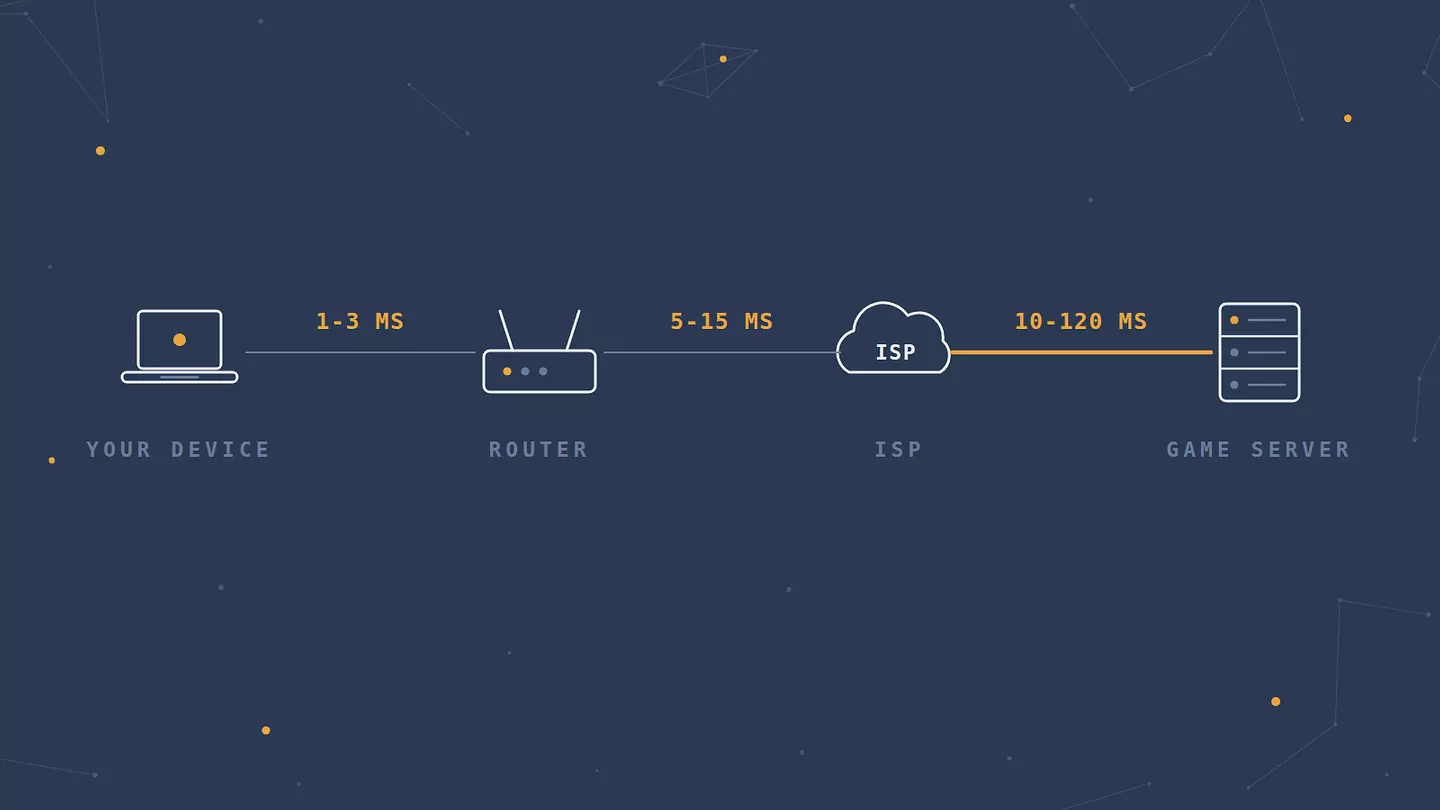
Start with your ping to your own router. On Windows, open Command Prompt and run ping 192.168.1.1, using whatever your router's address is, usually printed on the underside. The same command works in Terminal on macOS and Linux. Over a cable you should see 1 to 3 ms. Over Wi-Fi, under 10 ms is healthy. If this number is already 30 ms, nothing beyond your living room is the problem.
Then trace the route. Run tracert google.com on Windows, or traceroute google.com on macOS and Linux. You'll get a numbered list of hops with timings, and what you're looking for is where the number jumps. A jump at hop one or two points at your home network or the line into your building. A jump three or four hops in usually means your ISP. A gradual climb across many hops is just distance, and distance is not a fault.
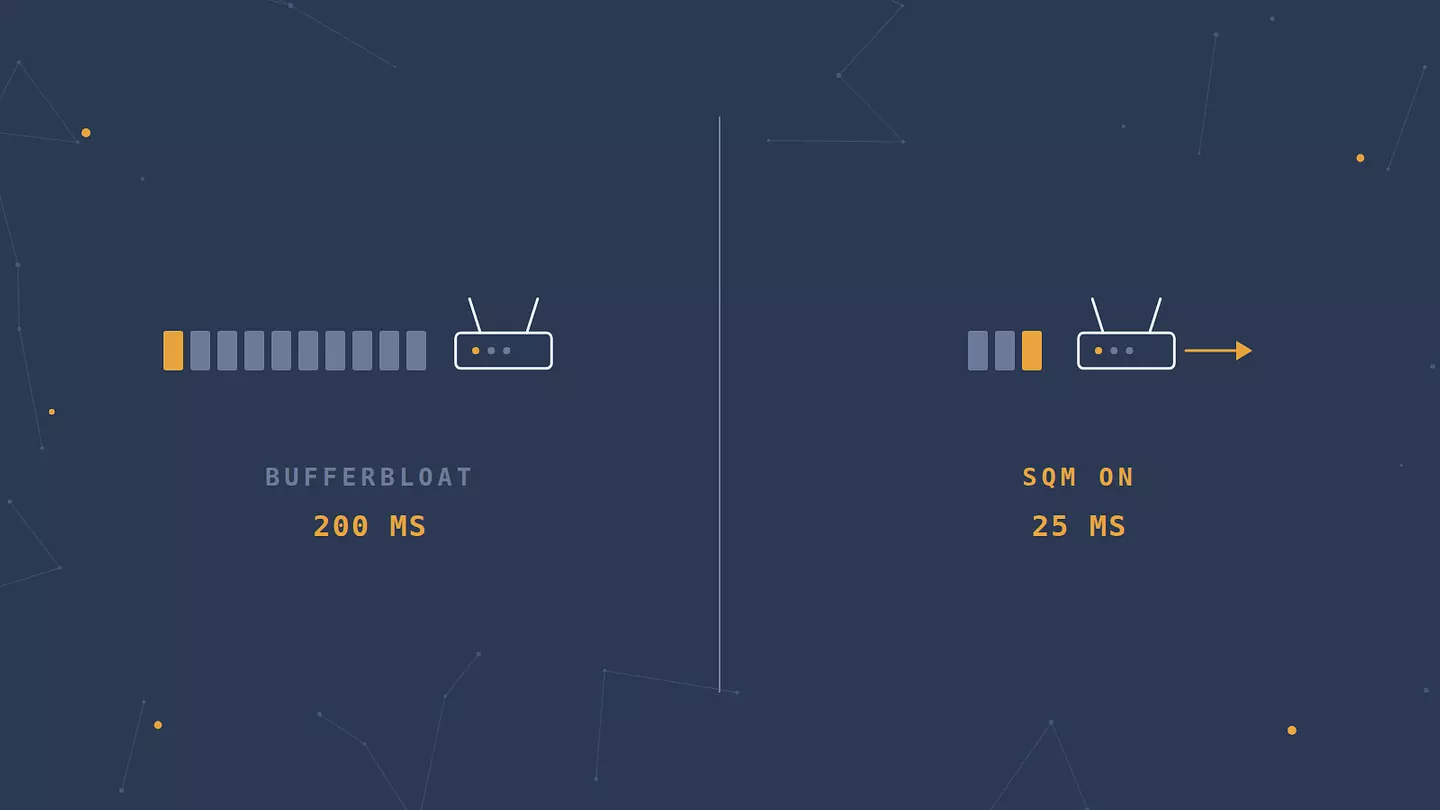
Now the check nobody tells you to run: start a large upload, then watch what happens to your latency while it goes. If your ping is 25 ms idle and 200 ms while a cloud backup runs, your router is buffering badly. That's bufferbloat, and it has a specific fix further down.
Finally, compare your in-game ping to your ping to a nearby website. If the game shows 140 ms and a local site answers in 15 ms, your connection is fine and the game server is either far away or badly routed.
The fixes that move the number
Plug in an Ethernet cable
This is the single biggest improvement available to most people, and it costs about ten dollars. A cable removes wireless interference, competing devices, and the retransmissions that come with both. Expect somewhere between 5 and 30 ms, plus a much bigger drop in the random spikes that lose you fights.
Any Cat 5e cable handles gigabit fine. You do not need Cat 8.
If you can't run a cable, fix the Wi-Fi properly
Move to the 5 GHz band. It's less crowded than 2.4 GHz and picks up less interference from microwaves, baby monitors, and every neighbor's router. The tradeoff is shorter range, so it works best when you're in the same room or one wall away.
Then look at what else is on your network. A router juggling twelve devices is making scheduling decisions constantly, and each one is a small delay. If your router lets you set a channel manually, pick one your neighbors aren't sitting on. Never opened your router's settings? Our step-by-step guide to securing a home Wi-Fi network covers how to get in and what the settings do.
Hotel and cafe Wi-Fi deserves a warning: it's shared, usually throttled, and terrible for anything real-time. It's also worth knowing what public Wi-Fi exposes beyond slow speeds before you sign in to your game account on one.
Connect to the closest game server
Most games let you pick a region, and most quietly default to the wrong one after a patch. Distance sets a hard floor on your ping that no setting can beat: light in fiber covers roughly 200 kilometers per millisecond, and the route is never a straight line. A round trip from Berlin to a server in Virginia costs about 90 ms before anything else goes wrong.
Check your region setting. Check it again after every major update.
Free up your upload, not your download
Ping problems are almost always upload problems. Downloads are the bigger number in your plan and rarely the constraint. A cloud sync, a game update seeding in the background, a security camera streaming, or someone in the house on a video call will fill a modest upload channel and push every game packet into a queue behind it.
Pause the sync client. Check whether Steam, Epic, or your console is pulling updates in the background, which they all do quietly by default.
Restart the router, then work out whether it's the bottleneck
Restarting fixes more than it has any right to, because consumer routers leak memory and accumulate stale connection state over weeks of uptime. Unplug it for thirty seconds.
If the improvement lasts two days and then your ping climbs again, the router itself is struggling. That's a hardware answer rather than a settings one, and ISP-supplied units are the usual culprit.
Turn on QoS or SQM to kill lag spikes
If your diagnosis showed low ping at idle and terrible ping under load, this is your fix, and almost no gaming guide mentions it.
Bufferbloat is delay caused by network equipment holding too much data in its buffers. Routers were designed to avoid dropping packets at all costs, so they queue instead, and a queue several hundred milliseconds deep is a queue your game packets have to sit in. The Bufferbloat project's own introduction describes the result as smooth traffic turning into stuttering, which is exactly how it feels.
The fix is Smart Queue Management, listed in router settings as SQM, QoS, or sometimes fq_codel or CAKE. Turn it on and enter your real upload and download speeds at roughly 85 to 90 percent of what you measure. Giving up that slice of raw throughput is what lets your router manage the queue instead of your ISP's oversized buffer doing it badly.
Check the firewall and background updates
Add your game as an exception in your firewall rather than switching the firewall off. Deep packet inspection on every frame adds processing time, and an exception skips it for one application without leaving the rest of your machine open.
While you're in there, turn off automatic updates during play hours in Windows, Steam, and your launcher of choice. An update that starts mid-match is a lag spike with a cause.
Change the connection type, not the number in your plan
Going from 300 Mbps to 1 Gbps on the same fiber line will not lower your ping. Bandwidth and latency are different properties, and you're already not using the bandwidth you have.
Changing the technology does help. Older geostationary satellite runs 500 ms and up. Mobile networks sit in the tens of milliseconds on a good 5G cell and much worse on a congested one. Cable and DSL are fine. Fiber is better, mostly for what it does to jitter rather than the raw number. If you're on satellite or tethering, that's your ceiling, and it's the one case where switching plans is the answer.
Does a VPN help with ping?
Sometimes, and it hinges on one specific thing: whether your ISP is routing your traffic badly.
A VPN can lower your ping when your provider throttles gaming traffic, or when it hands your packets to a poorly peered route that wanders through three countries to reach a server two hundred kilometers away. Connecting through a VPN server close to the game host replaces that route with a better one. When this applies, the improvement is real, usually 10 to 40 ms.
It won't help when your route is already direct. Adding an encryption step and an extra hop to a connection that was efficient to begin with costs you a few milliseconds rather than saving any. No VPN beats the speed of light, and no VPN makes a Tokyo server closer to Lisbon.
The honest test takes five minutes. Note your in-game ping, connect to a VPN server in the same region as the game server, and check again. If it improves, your ISP was the problem. If it doesn't, you've learned your routing was fine, which is worth knowing before you spend another evening on this.
Two practical notes. For a desktop or console game, use a VPN that covers the whole device rather than just a browser: Browsec's desktop app for Windows, macOS, and Linux routes all system traffic, while the browser extension covers browser traffic and browser games. And the protocol you pick matters, because the heavier ones add measurable overhead. If you're weighing this against a cheaper option, proxies work differently from VPNs and generally do nothing for routing.
Consoles and phones: what changes
The physics are the same everywhere. What differs is which settings you can reach.
On a PS5 or Xbox
Ethernet still wins, and a powerline adapter through your electrical wiring beats Wi-Fi across two walls. On wireless, force the console onto 5 GHz rather than letting it choose.
Then check your NAT type, reported as Open, Moderate, or Strict on Xbox and Type 1, 2, or 3 on PlayStation. A strict NAT doesn't add latency by itself, but it pushes you into relayed connections that do. Enabling UPnP on your router fixes it for most people. And turn off background console downloads, which run by default.
On Android and iOS
Mobile ping swings more than a fixed line does, and it's usually the cell rather than the phone. Signal quality drives retransmissions, so moving to a window is not a superstition. Battery saver is the invisible one: on both platforms it throttles network activity and CPU wake-ups, and the result reads exactly like lag.
Carrier routing is also worse than home ISP routing more often than you'd expect, especially while roaming or on a budget MVNO. That's the case worth testing with a mobile VPN, and Browsec has apps for Android and iPhone and iPad. Same test as on desktop: note the in-game number, connect to a server near the game's region, compare, keep whichever was lower.
What won't lower your ping
Ping booster apps are mostly reselling one of two things: a VPN route, or a script that closes background processes. The first you can test yourself. The second saves you a couple of milliseconds of CPU scheduling and does nothing to your network path. Neither justifies a subscription.
Upgrading your speed tier does nothing if you already have more bandwidth than you use, which almost everyone does.
Closing every process in Task Manager is theater. Unless something is using the network or pinning your CPU at 100 percent, it isn't touching your ping.
Gaming DNS servers change how quickly domain names resolve, which affects how fast a launcher loads, not in-game latency. Once you're connected, DNS is out of the picture.
Expensive cables buy nothing. Cat 5e already handles gigabit at household distances.
Here's the whole thing in one place:
What's causing it | The fix | Roughly what it buys you |
|---|---|---|
Wi-Fi instead of a cable | Plug in Ethernet | 5-30 ms, plus far fewer spikes |
Distance to the game server | Switch region | 10-150 ms, depending how far off you were |
Something uploading in the background | Pause it, or set QoS rules | 20-100 ms while it runs |
Bufferbloat in the router | Enable SQM or QoS | 50-200 ms of loaded latency |
Old or overloaded router | Restart, replace if it recurs | Varies |
ISP routing badly to the game host | VPN server near the host | 10-40 ms when it applies, nothing when it doesn't |
Strict NAT on a console | Enable UPnP or forward ports | Better matchmaking, fewer relayed connections |
Battery saver on a phone | Turn it off during play | Removes stutter that reads as lag |
Satellite or mobile connection | Change connection type | 30-500 ms |
Firewall inspecting game traffic | Add an application exception | A few ms, more under load |
FAQ
Is zero ping possible?
No. Data has to physically travel to the server and back, and even at the speed of light through fiber that takes time. The lowest realistic figure is 1 to 5 ms, and only if the server is in the same city. Anything advertising zero ping is advertising a number that can't exist.
Why is my ping high when my internet is fast?
Because speed and delay measure different things. Bandwidth is how much data fits through the pipe at once; ping is how long a single packet takes to make the trip. A gigabit connection routed badly, or a gigabit connection through a router with a bloated buffer, loses to a modest connection with a clean route every time.
Do ping booster apps work?
Rarely, and never for the reason they advertise. The ones that help are VPNs with a marketing layer on top, and they only help when your ISP's routing was the problem to begin with. The ones promising to optimize your system are closing background tasks, which isn't where your latency lives.
Does ping matter outside gaming?
Yes, anywhere the round trip is part of the experience. Video calls start feeling like walkie-talkies past roughly 150 ms of latency. Remote desktop and cloud gaming are worse still, since every keystroke waits for a full round trip. Streaming video and file downloads barely care, because they buffer ahead.
What's a good ping for a shooter versus an MMO?
For a competitive shooter, aim for under 30 ms and treat anything over 60 ms as a handicap you can feel. For an MMO, 100 ms is comfortable and even 150 ms is workable for most content, since the game resolves actions on a server tick rather than a frame. Raid mechanics with tight timers are the exception.
이 글 인용하기
Browsec. "How to Reduce Ping, Starting With What's Causing It." Browsec Blog, 2026년 09월 09일, https://browsec.com/ko/blog/how-to-lower-ping.